Published: May 12, 2024
Updated: April 26, 2026
Color Coding in Time Management
Color coding is more than just making your calendar look organized—it’s a powerful visual tool that can improve memory, focus, and time management. Studies show that using colors helps the brain categorize information faster and remember it more effectively. By assigning different colors to categories like work, personal life, or health, you can instantly visualize how your time is distributed and prioritize tasks more efficiently. In this article, we’ll explore how color coding works and how you can use it to turn your calendar into a clearer, more productive system.
P.S. This short article is focused on color coding for calendar apps especially, you can still benefit from the first general section.
A study by the National Library of Medicine focused on the effectiveness of color education in the study of the humanities, particularly the “History of Ukraine,” for medical students. The research aimed to identify the impact of color methods on memory retention and learning activity among medical students. The study employed various methods including structural and logical methods, questionnaire methods, observations, and descriptive and statistical methods.
The results of the study highlighted the importance of color education in enhancing memory retention and learning activity among medical students. It found that color-coding culture, which ranked first among the seven techniques to activate mental activity and memory retention intensification, was the most effective method used by medical students to remember information. The study concluded that color-based methods in the teaching of humanities are an effective method for improving the quality of students’ learning and allow for better memorization of learning materials, especially in distance learning environments.
What’s Color Coding?
Color coding is a technique where you assign different colors to represent different categories, tasks, or concepts. It’s a visual way to organize and prioritize information, making it easier to identify and remember.
How Does Color Coding Work?
The human brain is wired to recognize and process colors quickly. By associating specific colors with certain items or ideas, you create a mental shortcut that helps you remember and differentiate between different pieces of information.
Another study by Brianna S. Garrison and Aimee A. Knupfer was published in The Journal of Genetic Psychology in 2018. Researchers tested how color affects memory in older adults. They showed common words printed in different colors like red, blue, and black to people aged 65–98. After a delay, the participants tried to recall the words.
The study found that words shown in red were remembered much better than words in black or other colors. The researchers think red grabs our attention more and helps encode information deeper into memory. This demonstrates that using the color red strategically, like for highlighting important details, can boost memory performance, especially for older individuals trying to make information more memorable.
Colors symbolize/initiate feelings, for example:
Red symbolizes urgency and deadlines
Green symbolizes healing and nature
Blue initiates calm, it’s proven to be the calmest color to look at
Yellow is a symbol of energy, joy, and warmth
Take a look at the pic down below;
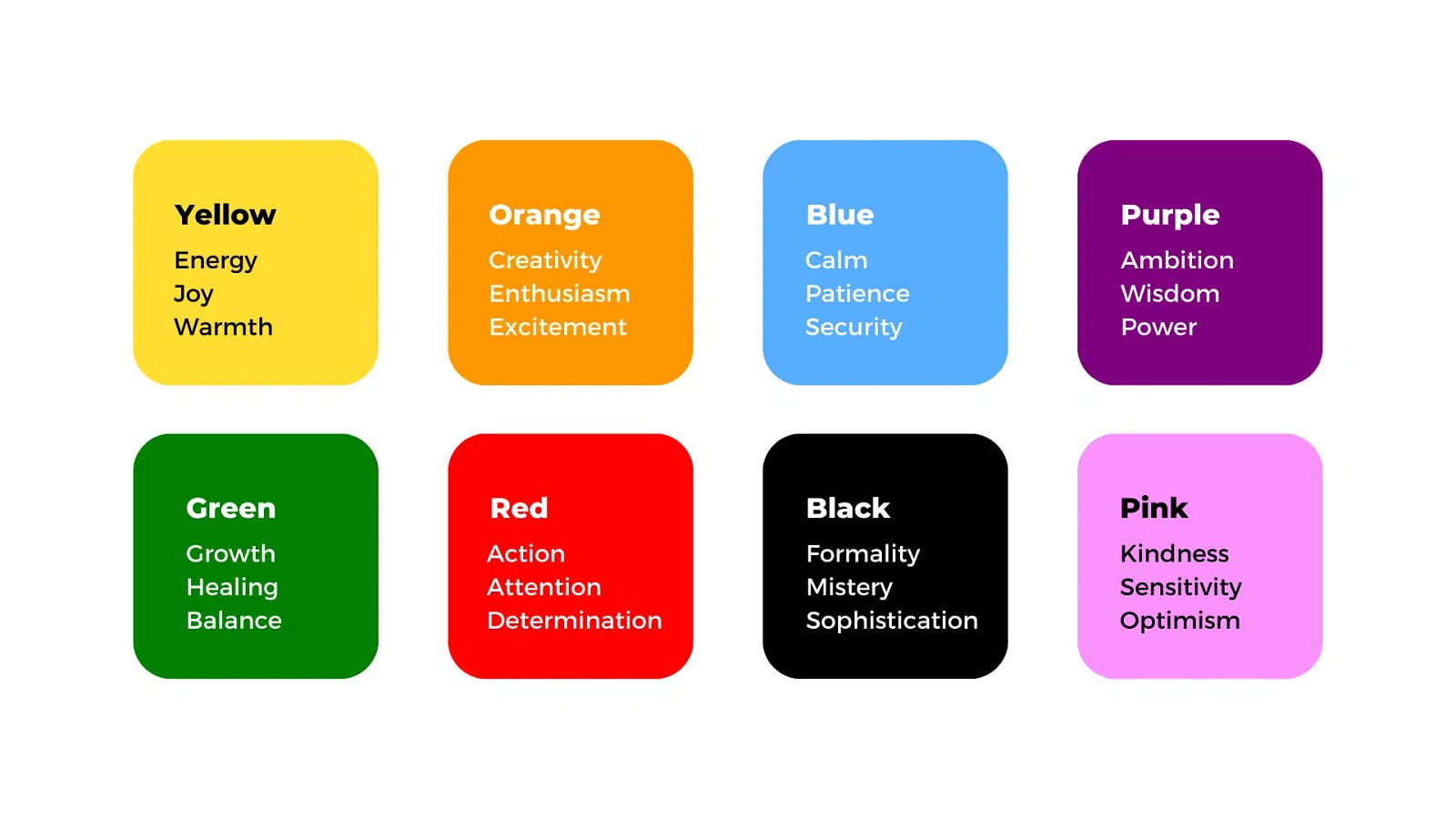
Credits: Virto Software
The use of colors acts as a visual cue that immediately catches your attention and triggers your memory. It’s like coding information into an easy-to-recognize system. That’s why taxi cabs are yellow in NYC.
Color coding works because it:
Enhances visual organization
Improves focus and mental processing
Improves memory recall
Quicker identification and categorization
By consistently using the same color groups, you train your brain to recognize and remember the coded information more efficiently. Color coding can be applied to various areas, such as note-taking, project management, file organization, and even learning new concepts or languages.
How Can We Use Color Coding in Calendar Management?
One of the most effective ways to leverage color coding for better time management is through calendar and task apps. By assigning different colors to different types of events, tasks, or projects, you can instantly visualize your schedule and priorities.
First of all, why is color coding important in calendar management?
Color coding your calendar is important for several reasons:
Visual Organization: Using different colors for different types of events, tasks, or commitments allows you to visually organize and categorize your schedule. This makes it easier to quickly identify how your time is divided across various areas of your life, such as work, personal, family, and so on.
Prioritization: Assigning specific colors to different priority levels (e.g., red for high priority, yellow for medium priority, green for low priority) can help you instantly recognize and prioritize your most important tasks or meetings. This can aid in better time management and ensure that you focus on your highest priorities first.
Context Switching: When you have a color-coded calendar, it becomes easier to mentally prepare for context switches between different types of activities or commitments. For example, if you have work meetings in one color and personal appointments in another, you can mentally shift gears more efficiently as you transition between different contexts.
Memory Retention: The use of colors acts as a visual cue that can enhance your memory retention and recall. By consistently associating specific colors with certain types of events or tasks, you create mental shortcuts that help you remember and differentiate between different commitments more effectively.
Reduced Cognitive Load: With a color-coded calendar, you don’t have to spend as much mental energy trying to decipher and organize your schedule. The visual cues provided by the colors reduce cognitive overhead, allowing you to focus your mental resources on more important tasks and decisions.
Increased Productivity: By making your calendar more visually organized and easier to navigate, color coding can help you better plan your day, manage your time effectively, and ultimately increase your overall productivity. You can quickly identify time blocks for focused work, meetings, or personal activities, and plan accordingly.
How to color code your calendar?
The catch here is, there’s no how-to for your color-coding your calendar app. You have a list of sentiments and feelings initiated by exposure to colors, but the same color code that works for me might not work for you as well. As you might know, contemporary calendars allow you to create various calendars with events in distinct colors, such as “Work,” “Family,” and “School,” for example. Color-coded calendars give you a clearer picture of how you should allocate your time. Let’s say you choose red for “Work” and blue for “Rest.” One day you might look at your calendar and see too much red in the evenings and not enough blue. This way you know it is time to make room for rest and recalibrate your work-life balance.
Color can be a useful tool for regulating your mind and setting it in the right direction. When structuring your calendar, try to fill it with colors that give you positive emotions. If you design a calendar for your team, we suggest opting for a classic coloring method, such as the red, amber, and green traffic light system, so it’s clear for everyone.
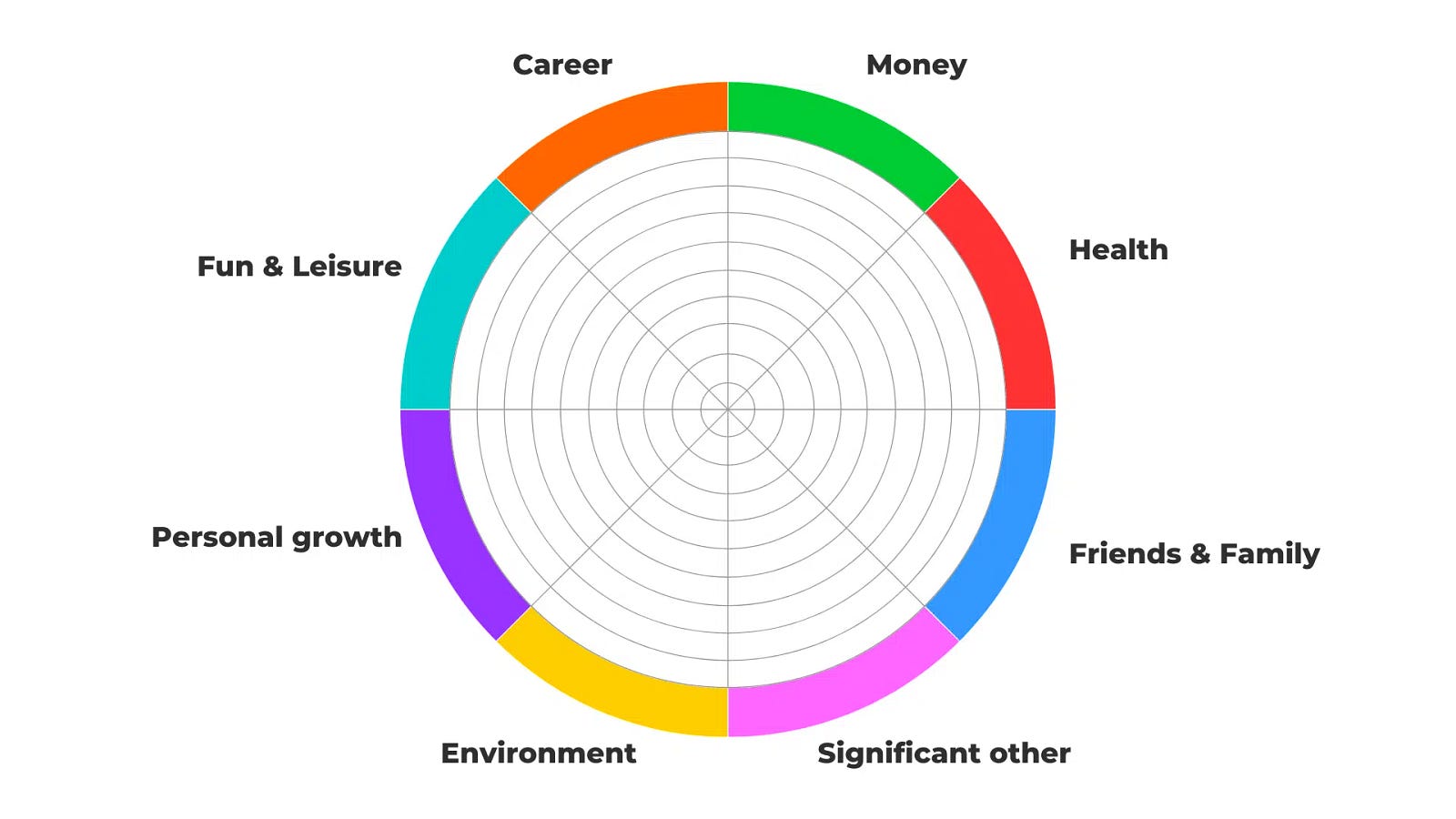
Credits: Virto Software
This is an example of a color code that Virto Software suggested, I say that it does the job. So should your chosen color code, it doesn’t matter if you chose pastels, solid colors, monochromatic shades, and so on. As long as it works, you’re good to go.
See color coding is important to have a clearer view of your calendar, to prioritize better, and to differentiate easily between tasks and time blocks, take a look at the two calendar screenshots down below, and tell me in the comments which one feels more pleasing to look at. And don’t get me wrong, some people might like the first pic better! But the point here is to better differentiate between tasks’ categories.


How Did I Color Code My Calendar?
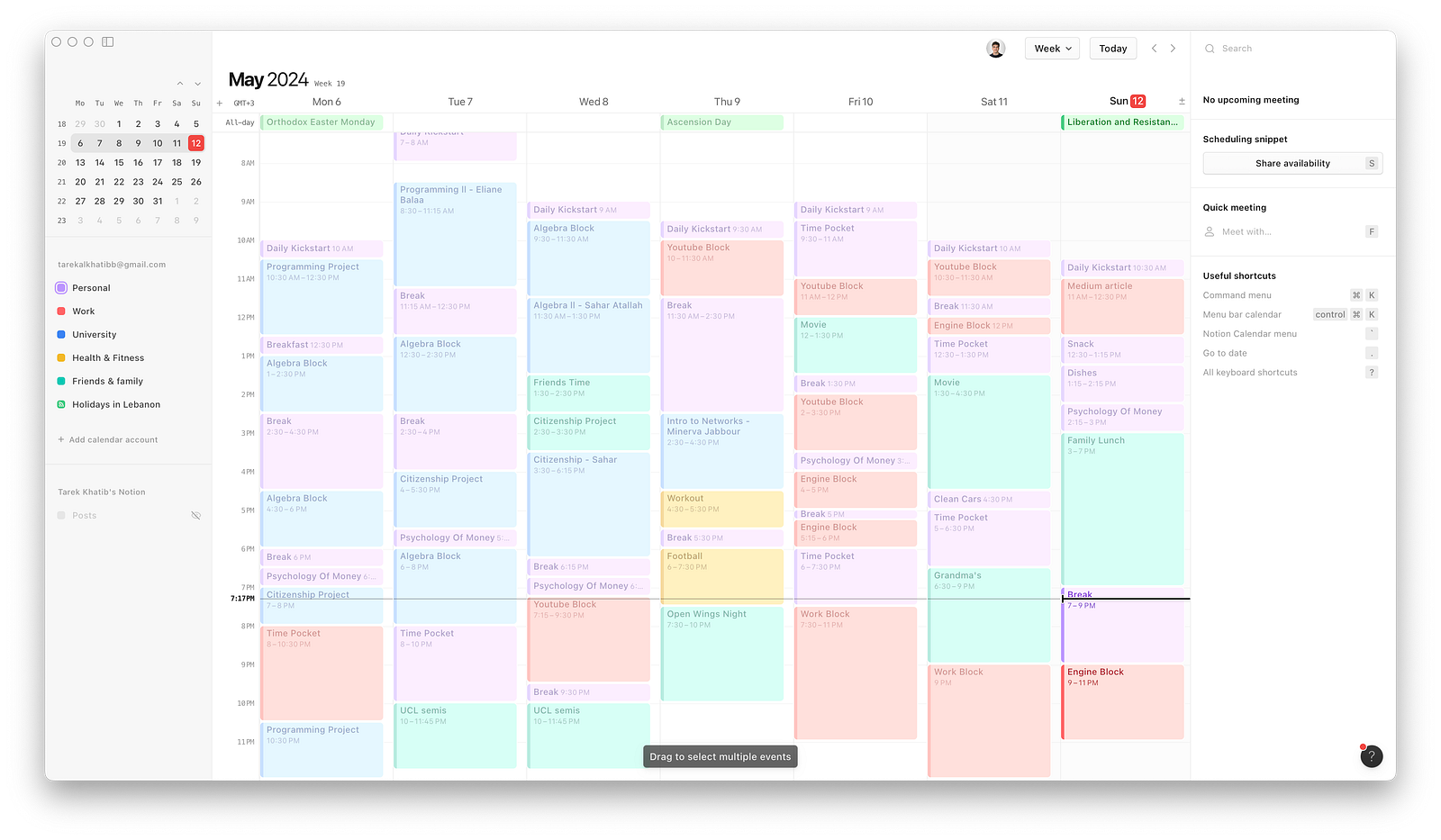
I have 5 calendars. And I suggest you have more than one calendar, (instead of color-coding tasks in the same calendar — which takes, forever).
For my Personal calendar, I used a Lavender shade, since it’s my favorite color. You can choose your favorite color for your Personal calendar, it’s the easiest to think of.

For my Work calendar, I chose the Imperial Red color. Which looks like a mix of reds and oranges. It gives me a feeling of urgency, creativity, and most especially attention, as it’s the brightest color on my calendar.

For my University calendar, I use my university’s theme color — Blue. Which also symbolizes calmness.

For my Health & Fitness calendar, which mostly includes workouts, I chose Yellow, as an energetic color, which also initiates joy and optimism.

And finally, for my Friends & Family calendar, I chose Green. I just felt like it, it’s the color of nature, the symbol of healing and growth. I couldn’t find a better fit for this calendar.

Final Look of my calendar:
Conclusion
Color coding is a powerful technique that can significantly improve your time management skills and productivity. By leveraging the brain’s ability to process visual information quickly, assigning specific colors to different types of events, tasks, or priorities creates an intuitive organizational system within your calendar.
While there is no one-size-fits-all approach to choosing a color coding scheme, the important thing is to establish consistent color associations that resonate with you. A well-organized, color-coded calendar acts as a visual anchor, helping you navigate through your day with greater clarity and focus. In today’s demanding world, color coding can be a game-changer for regaining control over your schedule and achieving a better work-life balance.